Webhooks documentation
Important
The Webhooks functionality is not available in the standard version of Comprovai. If you do not have access, please contact our sales team
Summary
Introduction
- What are Webhooks
- Event flow overview
Configuration
- How to register your endpoint
- Prerequisites (HTTPS, authentication, etc.)
Request Structure
- Payload Webhook Properties
- Example response JSON
- Reply to Verified
Available events
- Document Events
- Route Events
Retries and Delivery
- Retrieval policy
Good Practices
- How to design a resilient endpoint
Troubleshooting
- Why am I not receiving events?
- Duplicate events
- Endpoint slow or unavailable
- Manual forwarding of events
FAQ
- What is the maximum endpoint timeout?
- What happens if my endpoint is down?
- Is there a payload size limit?
- Can I receive webhooks in batch (several events together) or is it always one at a time?
- How to handle duplicate events?
- Is there an approval/testing environment for webhooks?
- Does the webhook guarantee event delivery order?
- Can I reprocess an old webhook? Is there an API for this?
- What are the IPs/sources that I need to release in the firewall?
Introduction
What are Webhooks
Our Webhooks system allows customers to configure callback URLs, which will be automatically notified whenever specific events occur on the platform.
Notifications are sent through HTTP POST requests, in JSON format, with authentication support through Basic Auth or Bearer Token.
Event Flow Overview
How It Works
1.The customer registers one or more URLs in the Webhooks configuration panel.
2.For each relevant event (e.g. route creation, trip start, delivery made, etc.), the system checks whether there are active webhooks for the type of event.
3.The system sends a POST request for each registered URL, with the event data in JSON format.
4.The client must respond with HTTP status 2xx to confirm successful receipt. If not, we will try again (see retries policy below).
Configuration
How to register your endpoint
You can access the webhooks screen through the path System > Webhooks .
To register, go to Webhooks > 3 dots > add
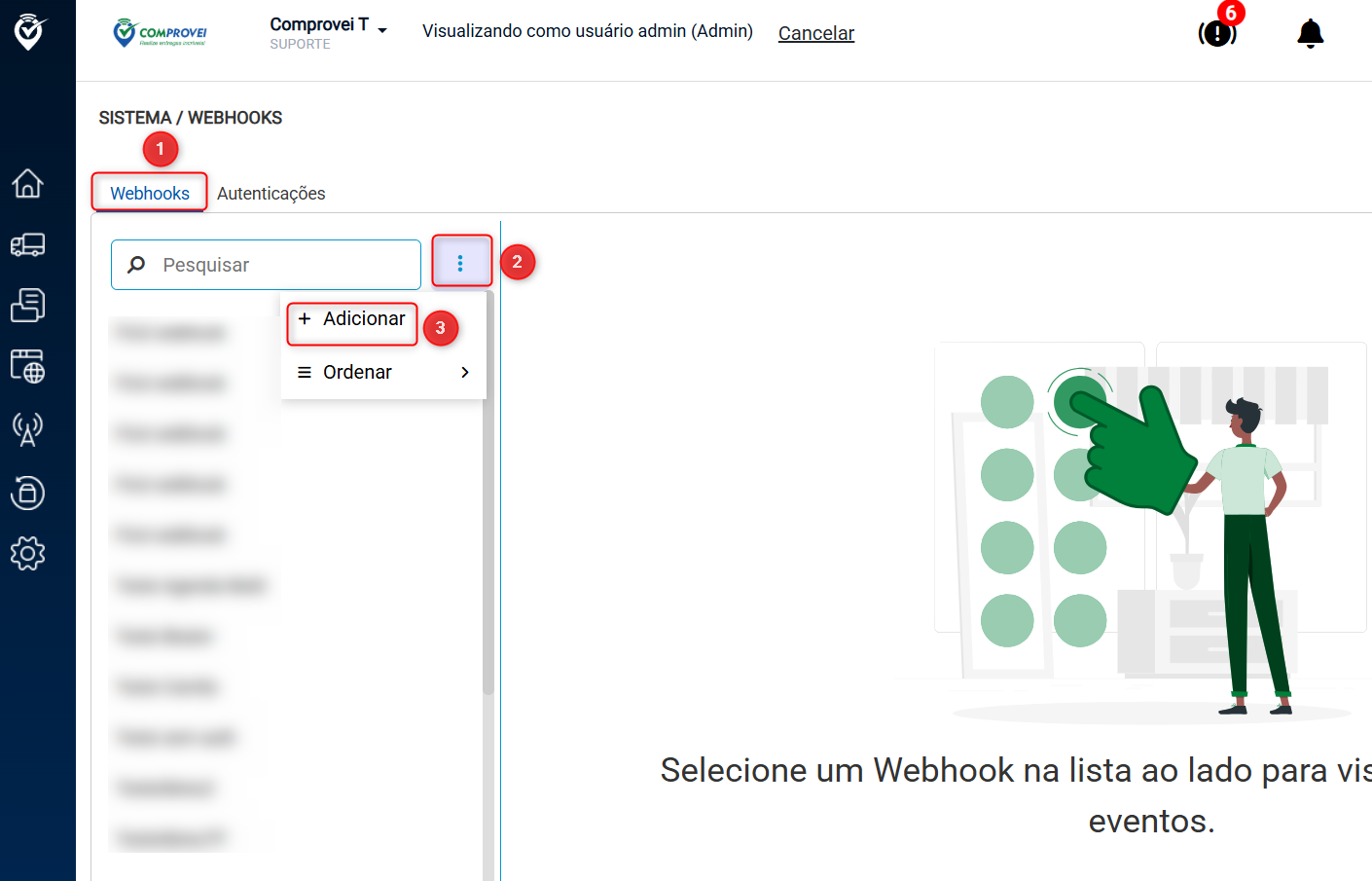
1 | |
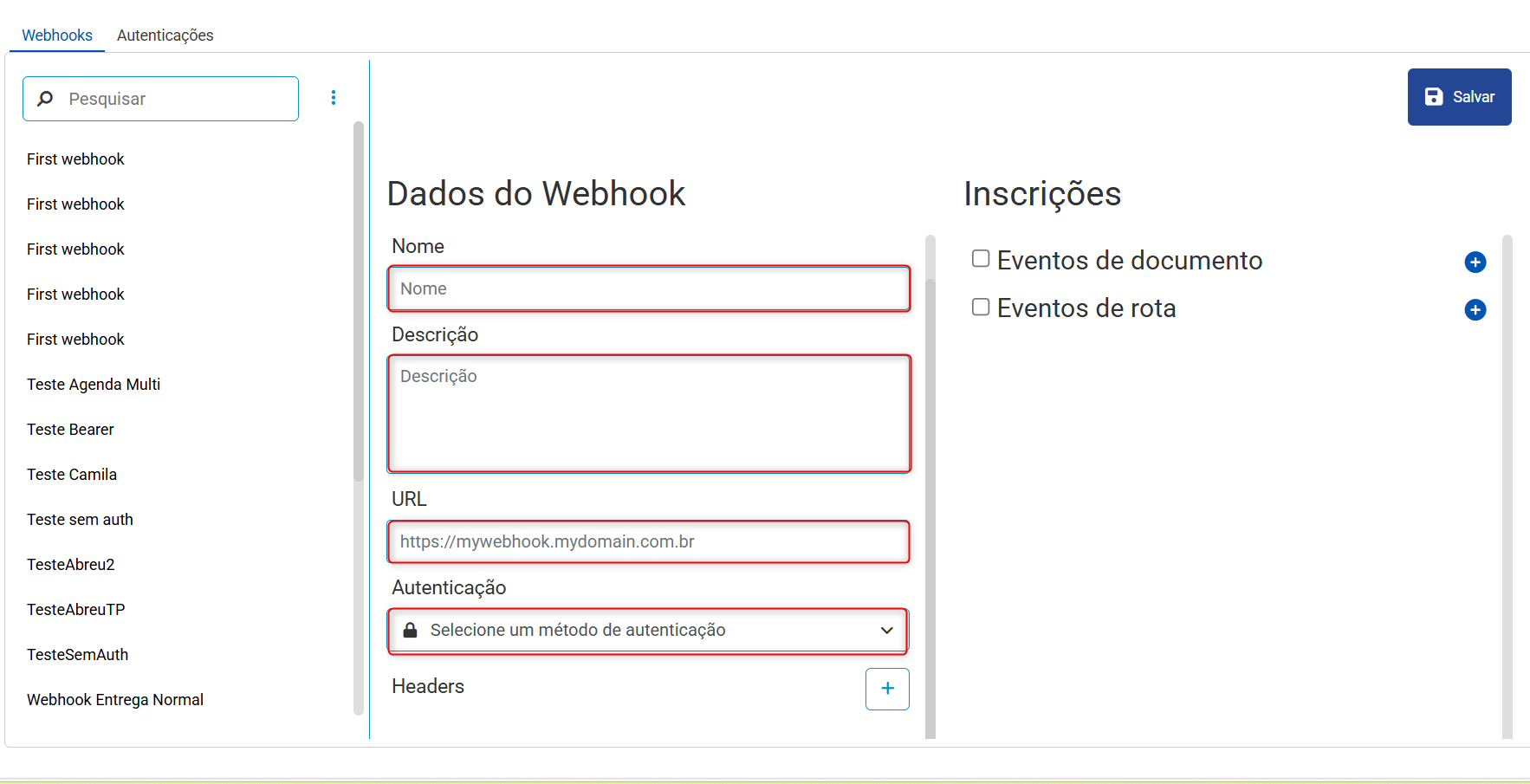
It is necessary to fill in the fields Name, Description, URL and select the type of authentication. Note: Only authentications previously registered in the Authentications tab will be listed under authentication. **
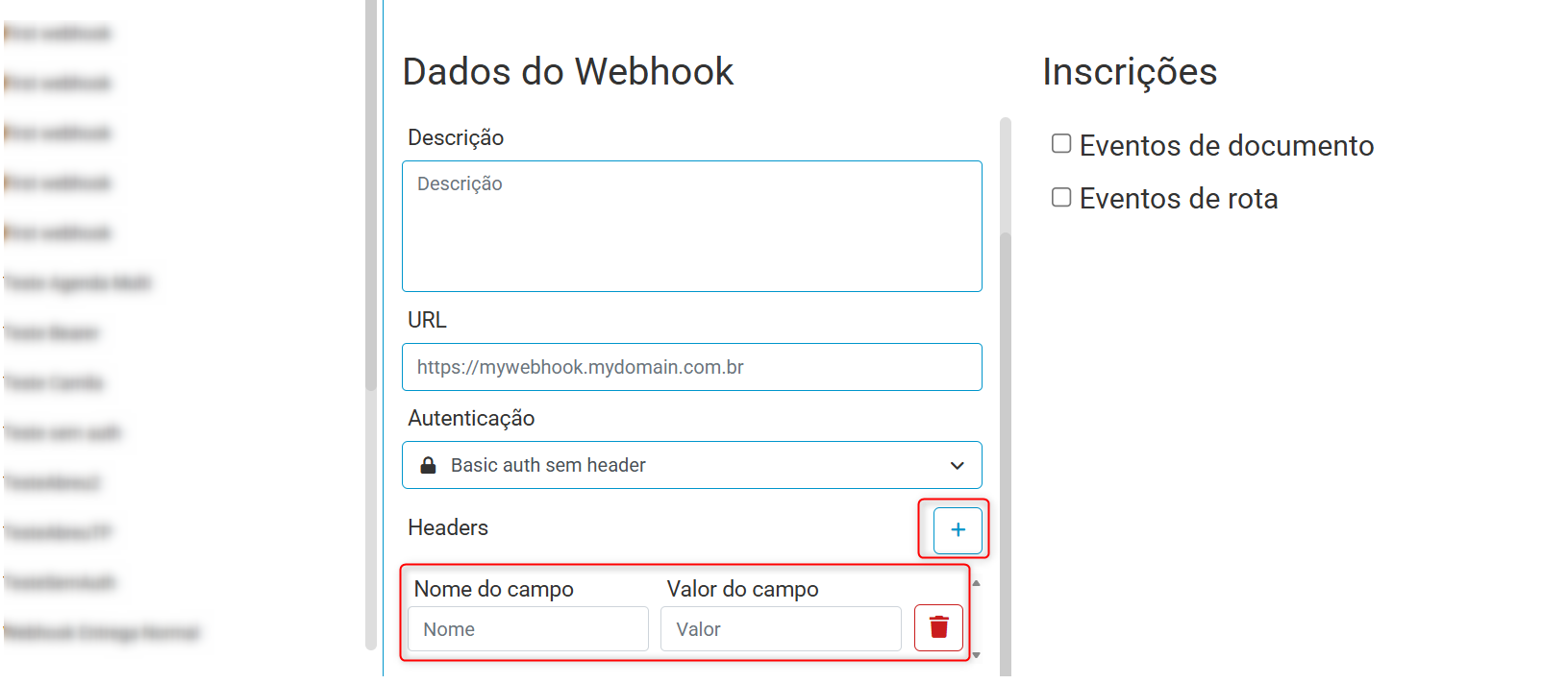
To add a Header, simply click Add. The fields Field name and field value must be filled in. It is possible to insert up to 10 Headers.
You can select the types of events you want to receive on your endpoint related to document events and route events. To view the available events, simply expand the chosen type and select the events you want to receive on your endpoint
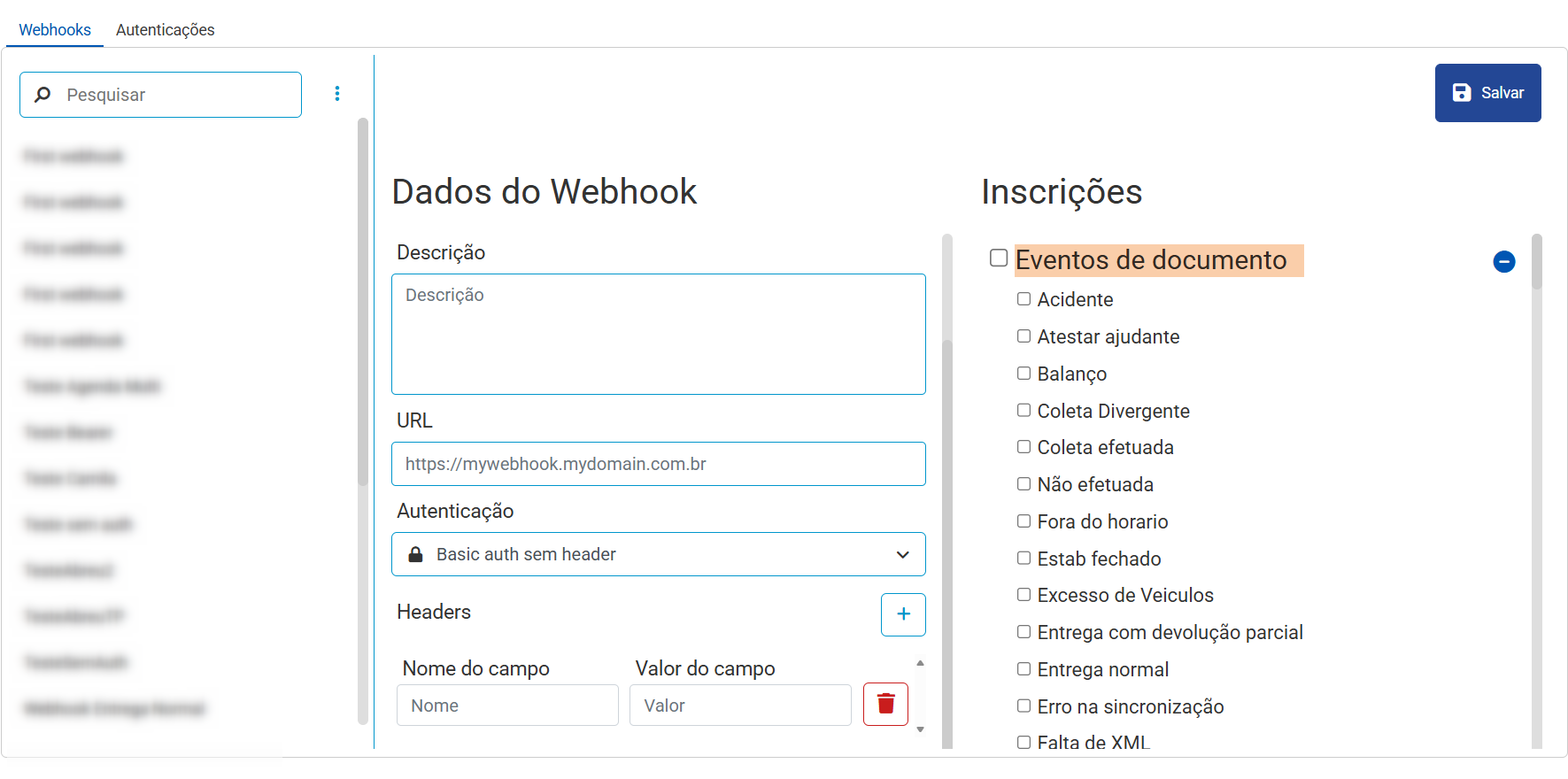
Document Events
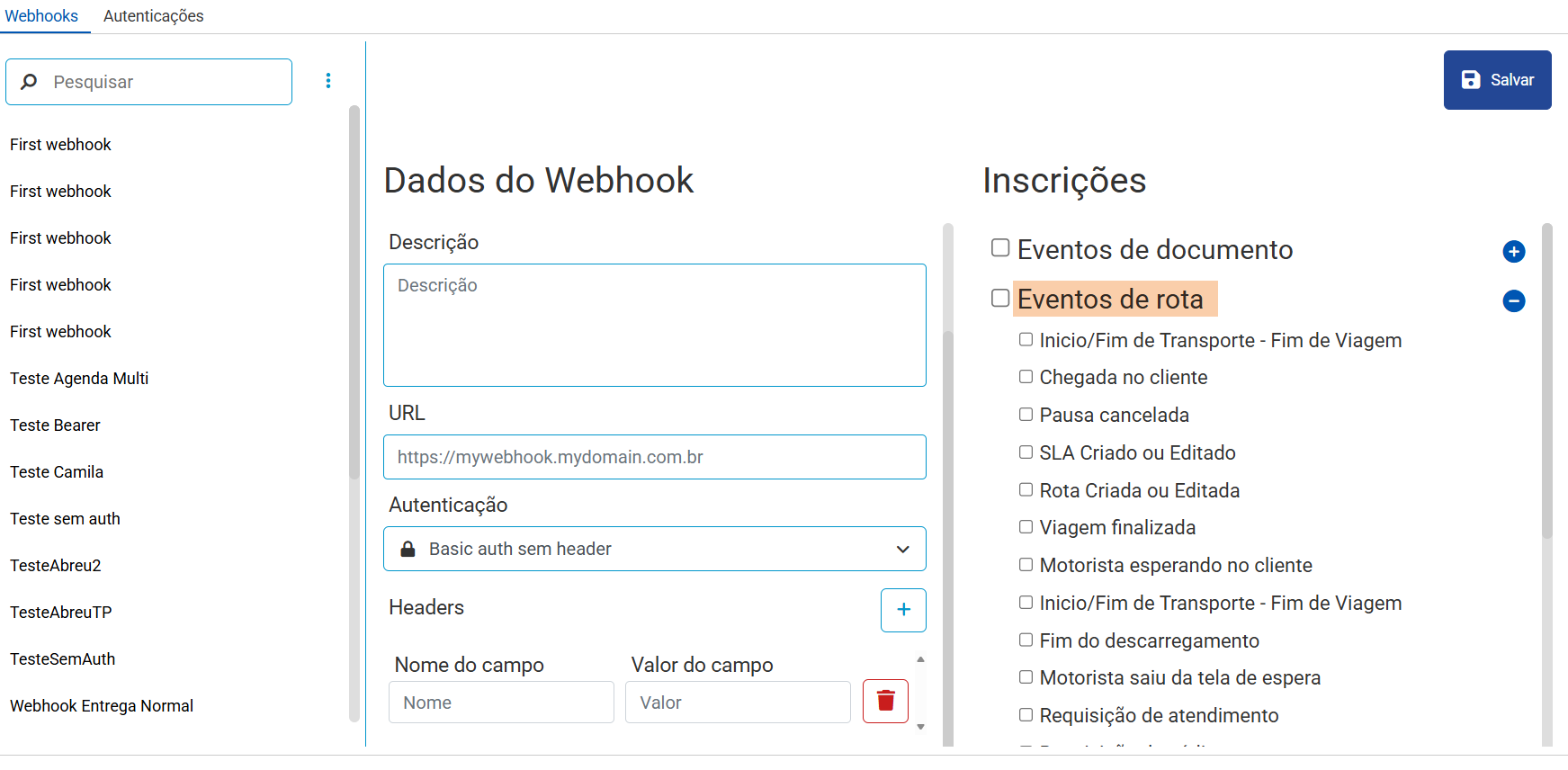
Route Events
To configure Authentications, simply go to the authentications tab and add.
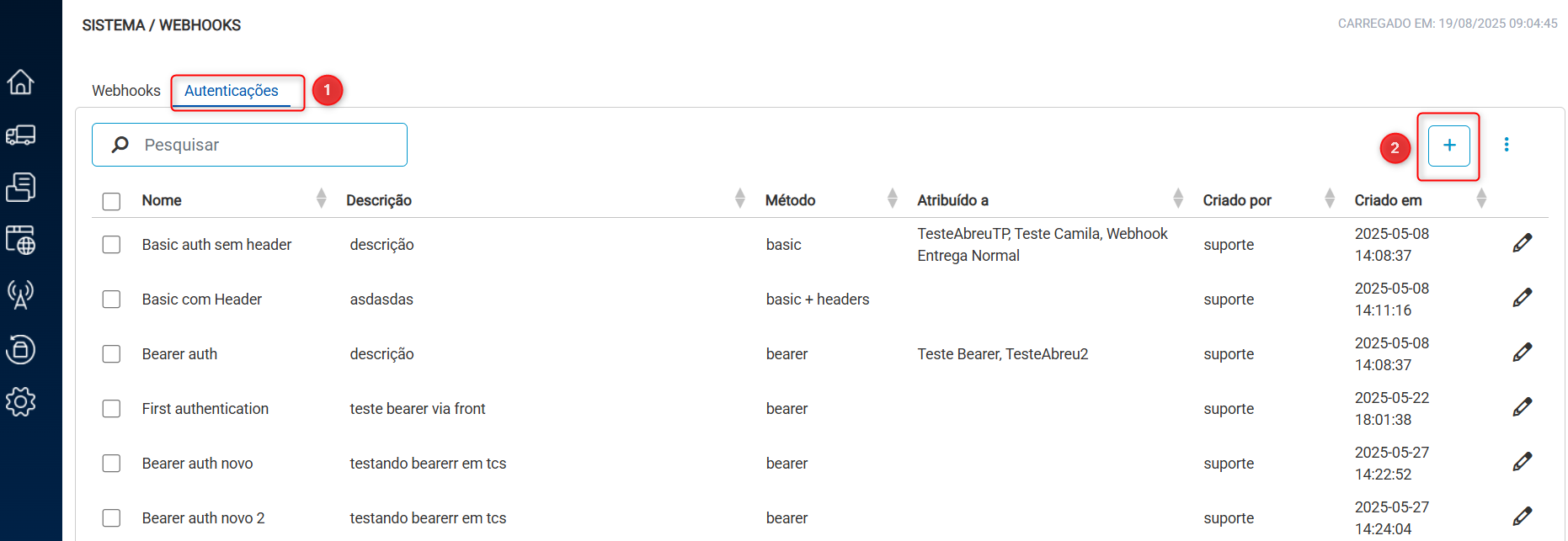
It is mandatory to fill in the fields Name, Description and Authentication method. Additional fields vary depending on the method chosen: Basic Authentication or Bearer Token.
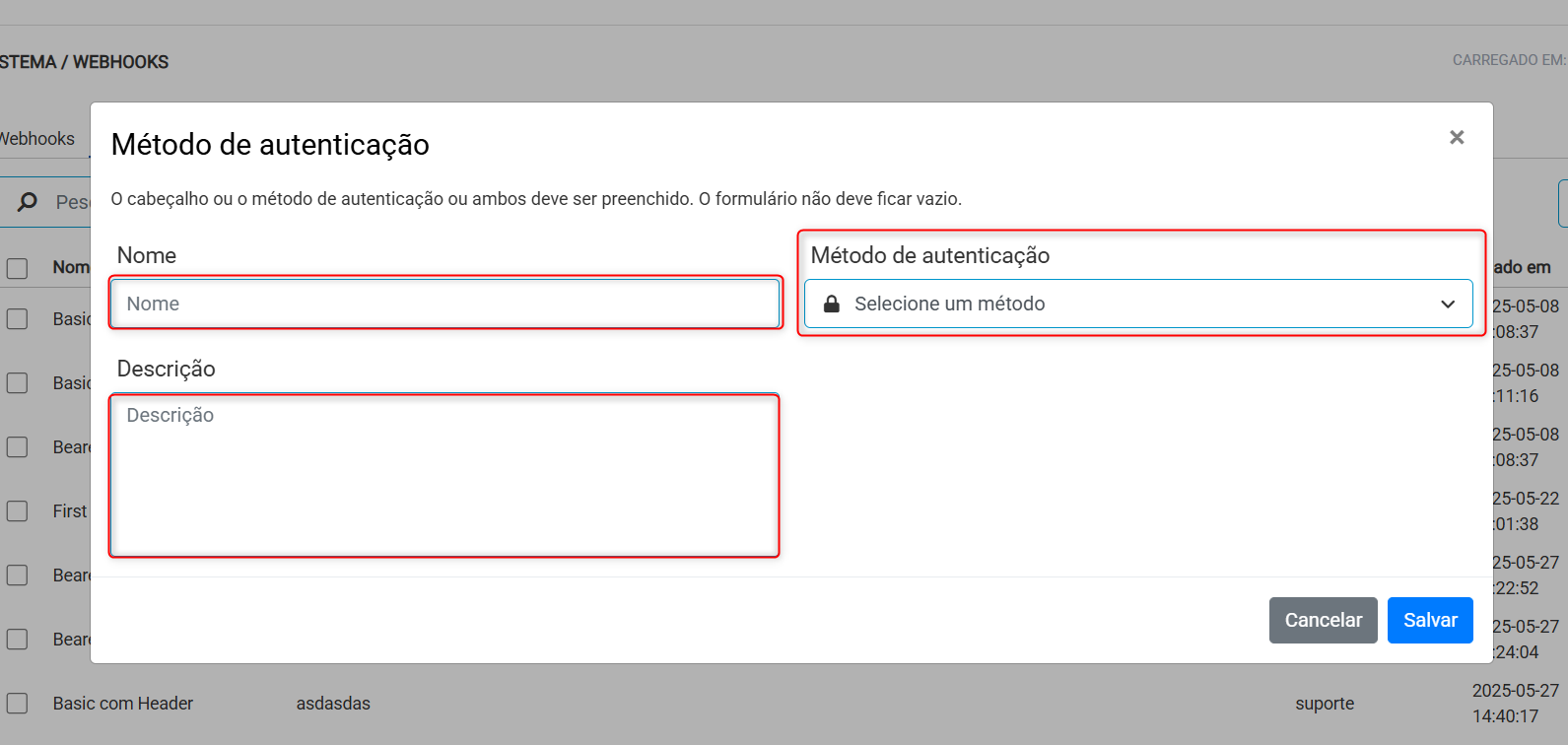
Authentication
Calls can use Basic Authentication or Bearer Token
Basic Auth
The customer must provide a username and password when registering the URL.
The request header will have the following format:
Authorization: Basic
Example: User: client123
Password: mySecretPassword
Header: Authorization: Basic Y2xpZW50ZTEyMzptaW5oYVNlbnhhU2VjcmV0YQ==
Bearer
An endpoint must be provided when registering the webhook to obtain the token
This token will be used for authentication on the endpoint that will be triggered by the webhook
Request Structure
Payload Webhook Properties
Document
| Field | Description |
|---|---|
| UUIDDocument | Hash unique identifier of that document |
| Key | 44-digit unique key |
| Type | Document type (NFe, MDFe, CTe, etc.) |
| Model | Document model (Ex: 55 = NFe) |
| Number | Document number |
| Series | Document series |
| CodCliente | CNPJ for Brazilian customers |
| InternalClient Code | End customer code, provided by the customer Comprovei |
| LinkTracking | URL for delivery tracking |
| CodeStatusDocument | Status code for that document (Full listing here) |
| DescStatusDocument | Name of the status of that document |
| Associated Orders | |
| Internal Request | |
| CustomerOrder | |
| OrderDate | List of requests associated with that document |
Route
| Field | Description |
|---|---|
| UUIDRota | Hash unique identifier of that route |
| Date | Route date (may not be the same execution date) |
| Name | Route identifier name |
| Number | Route number |
| CodMotorista | Driver's username (usually CPF) |
| CpfMotorista | Driver's CPF |
| Plate | License plate of the vehicle associated with the route |
| Type | D (Distribution), T (Transshipment), P (Place), R (Return) |
| Region | Region associated with that route |
| CNPJTransporter | CNPJ of the carrier associated with that route |
| UUIDEvent | Hash unique identifier of that exported event |
| DateTimeEvent | Date and Time of execution of that event |
| DateTimeSynchronization | Date and Time of synchronization of that event |
| EventSource | Comprovei Driver Application, Third-party application, Manual recording via the Comprovei Console, Other |
| CodeEventoComprovei | Unique event code within Comprovai |
| NameEventComprovei | Name of the event within Comprovai |
| DescEventoComprovei | Description of the event within Comprovai |
| CodeEventoNstech | Event code on the NSTech Platform (discontinued) |
| DescEventoNstech | Description of the event on the NSTech Platform (discontinued) |
| CodeEventoSistema3o | Event code sent by third party system |
| DescEventSistema3o | Description of the event sent by a third-party system |
| Proofs | List of events: Annex 2 |
| UserCod | Generally it will be the CPF, but it may not be. Important: the driver of the route may be one, but the person taking his place is another. That's why the user appears here in Verifications and in the Route |
| CpfUser | User's CPF, registered in the CPF field, different from the previous item, which is the username |
| ModelDevice | Model of the cell phone of the user who recorded the event (driver) |
| DeviceId | Internal Android ID of the user who registered the event (driver) |
| Coordinates | |
| -Latitude | |
| -Longitude | Geolocation collected at the time of that event |
| Photos | |
| Photo | |
| Comment | Comment made by the driver in the image |
| LinkPhoto | URL to access the proof photo |
| Smartscans | |
| Smartscan | |
| Comment | Comment made by the driver in the image |
| LinkSmartscan | URL to access the proof photo |
| Subscription | |
| Name | Name of person who signed |
| LinkSubscription | URL to access signature image |
| Comment | |
| Text | Text of the comment in the ‘annotation’ type proof |
| ConferenceItems | |
| CodeItem | Item code (usually SKU) |
| Description | Item Description |
| CodBarras | Item barcode |
| Expected Quantity | Expected quantity to be delivered/collected of that item |
| QuantityChecked | Quantity checked (beep) of that item |
| QualityProcedureDriver | |
| IndexQualityCalculated | Numerical value of calculated quality |
| Criteria | |
| Criterion | |
| Name | Criterion that was evaluated for quality |
| WeightAverageWeighted | Weight of that criterion for calculating the average |
| CriteriaServed | If that criterion was met (Yes/No) |
ETA
| Field | Description |
|---|---|
| CodeStatusETA | Discontinued (ignore) |
| DescStatusETA | Discontinued (ignore) |
| ETAOriginal | Date and Time of the initially calculated ETA |
| ETARrecalculated | Date and Time of the recalculated ETA |
| Recipient Window | |
| DateTimeStart | Delivery window start date and time |
| EndTimeDate | Date and Time of the end of the delivery window |
SLA
| Field | Description |
|---|---|
| DateTimeSLAOriginal | Original SLA Date and Time |
| DateTimeSLAadjusted | Adjusted SLA Date and Time |
| StatusSLA | On time, Scheduled - Delay, Completed - On time, Finished - Delay, initial version will always come with code and description |
Example JSON response:
[{
   "specVersion":"1.0",
   "type":"com.comprovei.EventoDocumento",
   "source":"Comprovei",
   "id":"b08a68121fa427dbb5e7876d5c4d797df70f744a53ea22e3698c5175ee323296",
   "time":"2022-11-03T15:19:49-03:00",
   "dataContentType":"application/json",
   "data":{
      "Rota":{
         "UUIDRota":"dc4eda751cb97602de952d6bd30c7b7fbfa832dd91bb2d0682e424f282f9c879",
         "Data":"2025-04-03",
         "Nome":null,
         "Numero":"Transbordo #123",
         "CodMotorista":"0015",
         "Placa":"ABC4321",
         "Tipo":"Transbordo",
         "Regiao":"",
         "CNPJTransportador":"33902814000170",
         "EmissaoCarbono":false
      },
      "Documento":{
         "UUIDDocumento":"60bd686a99237d88acfe380da348204de2772381f557908250f70388b8fb9753",
         "Chave":"35190412345678000123550010000012341000012345",
         "Tipo":"NFE",
         "Modelo":0001,
         "Numero":"000001234",
         "Serie":"0",
         "CodCliente":"13373113000184",
         "CodInternoCliente":"E01569",
         "LinkRastreamento":"",
         "CodStatusDocumento":"17",
         "DescStatusDocumento":"Transferido",
         "PedidosAssociados":[
            {
               "PedidoInterno":null,
               "PedidoCliente":"281044455",
               "DataPedido":"2022-11-03"
            }
         ]
      },
      "Comprovacoes":{
         "CodUsuario":"0015",
         "ModeloDispositivo":"707ee863aae11d06",
         "IdDispositivo":"SM-A115M""Coordenadas":{
            "Latitude":"-22.4245672",
            "Longitude":"-45.4492451"
         },
         "Fotos":[

         ],
         "SmartScans":[

         ],
         "ConferenciaItens":[
            {
               "CodItem":"0467911064000017",
               "Descricao":"Volume 00001/00001",
               "CodBarras":"0467911064000017",
               "QuantidadePrevista":"1",
               "QuantidadeConferida":"0"
            }
         ]
      },
      "QualidadeProcedimentoMotorista ":{
         "IndiceQualidadeCalculada":"0.00",
         "Criterios":"Criterio":[
            {
               "Nome":"INICIO_VIAGEM_DENTRO_CERCA_VIAGEM_ANTERIOR",
               "PesoMediaPonderada":"1",
               "CriterioAtendido":"Não"
            },
            {
               "Nome":"CHEGADA_NA_CERCA_LOCAL_ENTREGA",
               "PesoMediaPonderada":"0",
               "CriterioAtendido":"Não"
            },
            {
               "Nome":"FINALIZOU_COM_APONTAMENTOS",
               "PesoMediaPonderada":"0",
               "CriterioAtendido":"Não"
            },
            {
               "Nome":"TEMPO_ENTRE_MARCAR_CHEGADA_E_FINAL_MAIOR_QUE_O_MINIMO",
               "PesoMediaPonderada":"1",
               "CriterioAtendido":"Não"
            }
         ]
      }
   },
   "ETA":{
      "CodStatusETA":"",
      "DescStatusETA":"",
      "ETAOriginal":"2022-11-04T16:04:15-03:00",
      "ETARecalculado":"2022-11-04T16:04:15-03:00",
      "JanelaDestinatario":{
         "DataHoraInicio":"",
         "DataHoraFim":""
      }
   },
   "SLA":{
      "DataHoraSLAOriginal":"2022-07-12T11:39:45-03:00",
      "DataHoraSLAAjustado":"",
      "StatusSLA":""
   },
   "UUIDEvento":"b08a68121fa427dbb5e7876d5c4d797df70f744a53ea22e3698c5175ee323296",
   "DataHoraEvento":"2022-11-03T14:44:34-03:00",
   "DataHoraSincronizacao":"2022-11-03T15:19:47-03:00",
   "OrigemEvento":"Aplicativo Motorista Comprovei",
   "CodEventoComprovei":null,
   "DescEventoComprovei":"Arrival at Base",
   "CodEventoNstech":"1.01.99",
   "DescEventoNstech":"Inicio/Fim de Transporte - Fim de Viagem",
   "CodEventoSistema3o":"",
   "DescEventoSistema3o":""
}
}]
Response to Verified
If the request is successful, the endpoint triggered by the webhook must respond with status HTTP 200 and a message in the following format:
{

"status": 200

"message": "(qualquer string que queira retornar para o Comprovei)"

}
This way, the Comprovei system will understand that the message was received successfully and there is no need to resend it.
In case of error, send the HTTP code with the corresponding message
The status code must be sent in the message body and in the HTTP code
Available events
Our platform offers two types of events: Document Events and Route Events. Below you will find an example of each structure for better understanding.
In Document Events, we have the possibilities:
Document created/imported, Document added on route, Trip started, Arrival at the customer, Items checked/scanned, Delivery made, Trip aborted, Trip paused, Trip resumed, Scheduled/scheduled delivery, Changed SLA deadline, Changed delivery time, Delivery not carried out, Return, Canceled document, Edited document and Deleted document.
Example of Json related to Document Event
[{
   "specVersion":"1.0",
   "type":"com.comprovei.EventoDocumento",
   "source":"Comprovei",
   "id":"8a7934799c3e40c6e2cb960963e298753051288524a6003f529aa728c760fd40",
   "time":"2025-08-20T14:31:19-03:00",
   "dataContentType":"application/json",
   "data":{
      "Rota":{
         "UUIDRota":"27002046a838fe0db7dd4cd7b4a25f0c8ae8bca655a8bc61d1512a7dcc3f9c81",
         "Data":"2025-08-20",
         "Nome":"934212",
         "Numero":"13903699",
         "CodMotorista":"02862493406",
         "CpfMotorista":"02862493406",
         "Placa":"BBP7C14",
         "Tipo":"Distribuição",
         "Regiao":"119-FV SÃO JOSE DO MIBIPU",
         "CNPJTransportador":"14578966000115"
      },
      "Documento":{
         "UUIDDocumento":"9927709435a36e8de1bdfc81b9dbe87f317c88c67582c8ad704d780bf4a80ee2",
         "Chave":"24250883310441009173550010003771581252677686",
         "Tipo":"NFe",
         "Modelo":"",
         "Numero":"377158",
         "Serie":"1",
         "CodCliente":"10700961000405",
         "CodInternoCliente":"",
         "LinkRastreamento":"https://tracking.comprovei.com/#/track/UrbPoRGQ41zfnPLZlEi6SlWRPZZk+bn+",
         "CodStatusDocumento":"4",
         "DescStatusDocumento":"Entregue",
         "PedidosAssociados":[
            {
               "PedidoInterno":"24679536",
               "PedidoCliente":"69485516",
               "DataPedido":"2025-08-20"
            }
         ]
      },
      "Comprovacoes":{
         "CodUsuario":"02862493406",
         "CpfUsuario":"02862493406",
         "ModeloDispositivo":"SM-A055M",
         "IdDispositivo":"c6e2e672015fe4cb",
         "Coordenadas":{
            "Latitude":"-6.0365681",
            "Longitude":"-37.0211558"
         },
         "Fotos":[
            {
               "Comentario":null,
               "LinkFoto":"http://images.comprovei.com.br/0U63381V7wyWjykirqEfDQlVUeljZ+PftMFmI4Y1+QHdnq8osSjBA3YP/2UTCDHT/k6NVbx//kVawwmxA1dl0wslTv6AdrK+kgz5tRyn3vc+9WgAOxCRF54="
            }
         ],
         "SmartScans":[

         ],
         "ConferenciaItens":[
            {
               "CodItem":"979796978",
               "Descricao":"HAMBURGUER DE CARNE BOVINA - AURORA - SABOR P",
               "CodBarras":"2121",
               "QuantidadePrevista":"32",
               "QuantidadeConferida":"0"
            },
            {
               "CodItem":"979796979",
               "Descricao":"PAO DE ALHO - AURORA",
               "CodBarras":"2676",
               "QuantidadePrevista":"7",
               "QuantidadeConferida":"0"
            }
         ]
      },
      "QualidadeProcedimentoMotorista ":{
         "IndiceQualidadeCalculada":"0.00",
         "Criterios":{
            "Criterio":[
               {
                  "Nome":"INICIO_VIAGEM_DENTRO_CERCA_VIAGEM_ANTERIOR",
                  "PesoMediaPonderada":0,
                  "CriterioAtendido":"Não"
               },
               {
                  "Nome":"CHEGADA_NA_CERCA_LOCAL_ENTREGA",
                  "PesoMediaPonderada":0,
                  "CriterioAtendido":"Não"
               },
               {
                  "Nome":"FINALIZOU_COM_APONTAMENTOS",
                  "PesoMediaPonderada":0,
                  "CriterioAtendido":"Não"
               },
               {
                  "Nome":"TEMPO_ENTRE_MARCAR_CHEGADA_E_FINAL_MAIOR_QUE_O_MINIMO",
                  "PesoMediaPonderada":0,
                  "CriterioAtendido":"Não"
               }
            ]
         }
      },
      "ETA":{
         "CodStatusETA":"",
         "DescStatusETA":"",
         "ETAOriginal":"2025-08-20T11:20:00-03:00",
         "ETARecalculado":"2025-08-20T11:20:00-03:00",
         "JanelaDestinatario":{
            "DataHoraInicio":"",
            "DataHoraFim":""
         }
      },
      "SLA":{
         "DataHoraSLAOriginal":"",
         "DataHoraSLAAjustado":"",
         "StatusSLA":""
      },
      "UUIDEvento":"8a7934799c3e40c6e2cb960963e298753051288524a6003f529aa728c760fd40",
      "DataHoraEvento":"2025-08-20T14:24:27-03:00",
      "DataHoraSincronizacao":"2025-08-20T14:31:19-03:00",
      "OrigemEvento":"Aplicativo Motorista Comprovei",
      "CodEventoComprovei":"000",
      "NomeEventoComprovei":"Entrega normal",
      "DescEventoComprovei":"Entrega realizada normalmente",
      "CodEventoNstech":"1.22.01",
      "DescEventoNstech":"Entrega/Coleta Realizada - Sem Restrições",
      "CodEventoSistema3o":"",
      "DescEventoSistema3o":""
   }
}]
In Routes Events, we have the possibilities:
Route created/imported, Route started, Return trip started, Return trip paused, Route finished, Route edited and Route deleted.
Example of Json related to Route Event
{
   "specVersion":"1.0",
   "type":"com.comprovei.EventoRota",
   "source":"Comprovei",
   "id":"dff0f34ba5efdc0f5cdb1c855fd9b4c173ad694f1528c2796410e2fac3cc7fbe",
   "time":"2025-07-11T15:08:14-03:00",
   "dataContentType":"application/json",
   "data":{
      "Rota":{
         "UUIDRota":"f6c768c3d19cb8e9a5c962795cf3a9f1197a2bcfca6f1d45b4c141e69cdafbc1",
         "Data":"2025-07-11",
         "Nome":"",
         "Numero":"Rota 1 | a31e",
         "CodMotorista":"moura.brasil10",
         "CpfMotorista":"",
         "Placa":"LLP8790",
         "Tipo":"Distribuição",
         "Regiao":"",
         "CNPJTransportador":"12345678910123"
      },
      "Comprovacoes":{
         "CodUsuario":"moura.brasil10",
         "CpfUsuario":"",
         "ModeloDispositivo":"SM-M146B",
         "IdDispositivo":"19182e00abe20376",
         "Coordenadas":{
            "Latitude":"-22.4222531",
            "Longitude":"-45.4601146"
         },
         "Fotos":[

         ],
         "SmartScans":[

         ],
         "ConferenciaItens":[

         ]
      },
      "UUIDEvento":"dff0f34ba5efdc0f5cdb1c855fd9b4c173ad694f1528c2796410e2fac3cc7fbe",
      "DataHoraEvento":"2025-07-11T15:08:14-03:00",
      "DataHoraSincronizacao":"",
      "OrigemEvento":"Aplicativo Motorista Comprovei",
      "CodEventoComprovei":"route_started",
      "NomeEventoComprovei":"Route Started",
      "DescEventoComprovei":"Inicio/Fim de Transporte - Inicio de Viagem",
      "CodEventoNstech":"1.01.01",
      "DescEventoNstech":"Inicio/Fim de Transporte - Inicio de Viagem",
      "CodEventoSistema3o":"",
      "DescEventoSistema3o":""
   }
}
Retrying Deliveries
This feature is not yet available, but it is already on our priority list for development
Best Practices for Integration with Webhooks
To ensure that webhooks are delivered correctly and successfully processed by your system, we recommend following the practices below:
1. High URL Availability
- Make sure the configured URL is always available (24/7), especially if it is critical for internal processes.
- Use reliable infrastructure (such as cloud providers with high SLA) and, if possible, load balancers and redundancy.
- Avoid prolonged outages or firewall blockages.
2. Fast Response Time
- Keep URL response time less than 2 seconds whenever possible. •If processing takes a long time, respond 200 OK immediately and process the data asynchronously.
3. Security Validation
- Check the Basic Auth authentication header to ensure the call is legitimate. •Optionally validate the source IP or implement tokens/HMAC to strengthen security (contact us to configure this).
4. Treat All Requests with Idempotency
- Your endpoint must be able to handle resubmissions of the same event without causing side effects (such as creating duplicate requests).
- Use the UUID fields as a reference to detect duplication.
5. Monitor and Log Webhooks
- Keep detailed logs of all incoming requests, including time, payload, HTTP status and response time.
- Configure alerts for recurring failures or excessive slowness.
6. Use HTTPS
-
Always provide URLs with secure protocol () to protect data in transit. •Make sure the SSL certificate is valid and up to date.
https://
7. Manage Errors with Clarity
- In case of failure in your system, return appropriate HTTP codes (ex: 500, 503, 401) and clear messages to facilitate diagnosis.
- Do not return 200 OK if processing failed.
8. Avoid Aggressive Rate Limiting
- Allow our system to send multiple events in sequence without blocking due to request limits (rate limit).
- If limits apply, please inform our team so we can adjust the shipping rate.
9. Homologation Environment
- For new projects or changes in production, we recommend configuring a test/approval URL for prior validation of webhooks.
10. Have a Contingency Plan
- Implement internal queues and retry systems on your side if your API depends on external systems.
- Ensure that temporary failures do not prevent adequate consumption of events.
Troubleshooting
Why am I not receiving events?
If you are not receiving events, the most common reasons are:
- Incorrect endpoint: Check that your webhook endpoint URL is configured correctly on the platform. Any typographical error, such as a missing
.comor an extra/, may prevent delivery. - Connectivity issues: Make sure your server is online and publicly accessible on the internet. Firewalls or network configurations may be blocking requests arriving from our platform.
- Unregistered events: Please confirm that you have registered for the correct event types. If, for example, you want to receive "order created" events, but you only signed up for "payment approved", you will not receive the expected event.
- HTTP status codes: If your endpoint returns HTTP error codes (such as
4xxor5xx), our platform may stop trying to send the event, assuming there is a problem on your end.
Duplicate events
In some scenarios, you may receive the same event more than once. This usually occurs due to communication failures or timeouts during submission. To deal with this situation, the best practice is to make your system idempotent.
What is idempotence? It is the ability of an operation to produce the same result, regardless of how many times it is executed. To ensure this, use the unique event ID (or some other unique identifier, such as an order ID) to verify that the event has already been processed.
Example: Before processing an event, check whether the event ID already exists in your database. If yes, ignore it. If not, process and save the ID for future checks.
Endpoint slow or unavailable
If your webhook endpoint is slow to respond or is down, our platform will adopt a exponential backoff retry strategy to ensure delivery.
- Retries: We will try to send the event again at gradually increasing time intervals.
- Exponential
Backoff: With each failure, the waiting time before the next attempt increases. For example: 1 minute, 5 minutes, 30 minutes, etc., up to a maximum number of attempts or a total amount of time.
Best Practice: To prevent your endpoint from being considered unavailable, respond to the webhook request as quickly as possible (with a 200 OK) and process the event logic asynchronously.
Manual forwarding of events
If you need to reprocess an event that failed or was not received, you will need to open a ticket with our Support team. Later, we will have the option to manually resend on the webhooks screen.
FAQ
Frequently asked questions
Is there an approval environment? No
What is the maximum endpoint timeout?
Our platform does not set a hard timeout (timeout) for your endpoint. This means we will continue trying to send the webhook for an extended period of time.
However, it is crucial that your server responds to our request as quickly as possible. If your application takes too long to process the webhook, the connection may be terminated by our system, resulting in delivery failures.
What happens if my endpoint is down? Webhook marks error message and returned status
Is there a payload size limit? No
Can I receive webhooks in batch (several events together) or is it always one at a time? Theoretically yes, but at the moment we send 1 by 1. Organize your endpoint so it can receive an array.
How to handle duplicate events? Every event has an associated ID. It is at the discretion of the consumer.
Does the webhook guarantee event delivery order? No. We tried to ship in order, but without guarantee.
Can I reprocess an old webhook? Is there an API for this? Not today. It will be available in the future via the webhooks screen.